Changing a policy that is already published
Start a new version, decide what people who read the last one must do, and see what changed.
A published version never changes. When something needs to change, you start a new version, which begins as a complete copy.
Who can do this: Managers and administrators.
Start a new version #
- Open the policy and press Edit this policy. That is all: it starts the new version and opens it for editing.
You should see: "A new draft has been started from the current version. The published one stays in force until you publish this."
The draft is a copy of everything: the sections (each keeping its permanent link), the text, the pictures, the appendices (all marked Needs checking) and the questions. The version people are reading is untouched until you publish.
- Only one draft can exist at a time for a policy. If one is already in progress, the button changes to Continue editing the draft and takes you to it.
- The audience belongs to the policy and is not copied or changed.
What needs a new version, and what does not #
The wording of a published policy is locked, which is why Edit this policy starts a new version for you. Some things you can still change straight away on the published policy, without a new version; the rest need one.
| You can change at any time | Needs a new version |
|---|---|
|
|
Make the changes #
Edit parts, add or move sections, change appendices, edit questions, exactly as for a new policy. While you work, the outline shows New and Changed against the version in force, and a line says how many: "Compared with version 1.0: 0 new, 1 changed, 0 removed."
Decide what earlier readers must do #
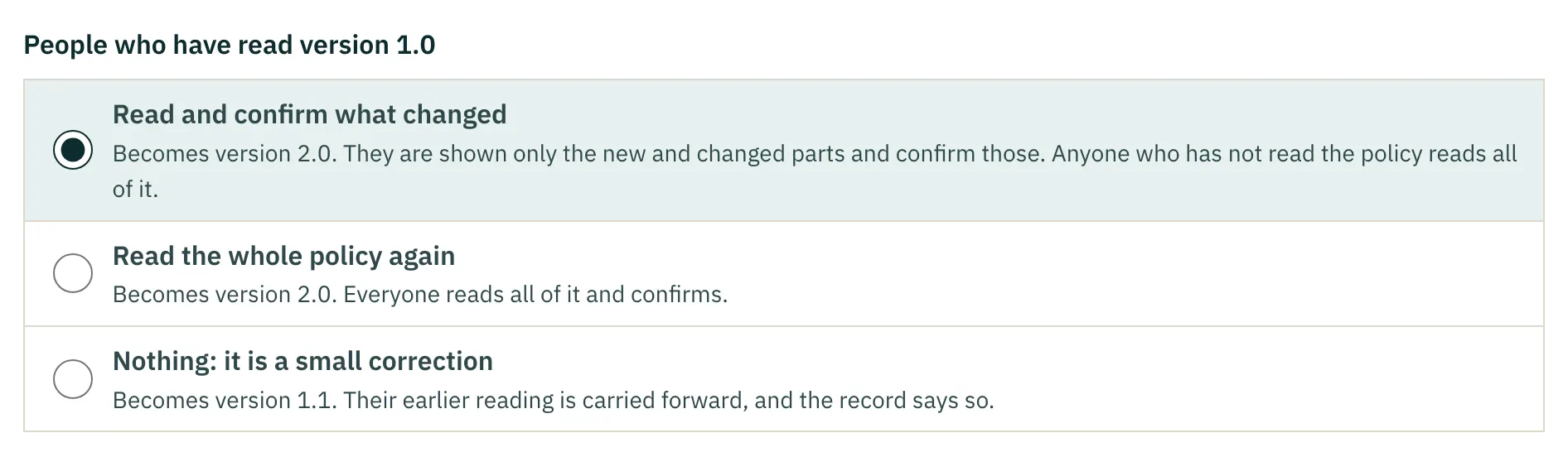
In This version you choose what happens to people who have read the version in force. This is the most important choice you make.
 (opens a larger view)
| Choice | Use it for | The new version is | What happens to people who read the last one |
|---|---|---|---|
| Read and confirm what changed (the usual choice for a new version) | A change to what people should do that they can understand from the changed parts | A major version: 1.0 becomes 2.0 | They see "Changed since you read it", read only the new and changed parts, and confirm those. The record says so. |
| Read the whole policy again | A rewrite, or a change that alters how the rest should be read | A major version: 1.0 becomes 2.0 | They see "To read again" and confirm the whole policy. |
| Nothing: it is a small correction | A correction that changes nothing about what people do: a typo, a changed phone number, a better sentence | A minor version: 1.0 becomes 1.1 | They are counted as having read this one. The record says "carried forward from version 1.0". |
People who have not read an earlier version always read the whole policy.
Confirming just the changes is offered only when there is something to show and the attached original document, if any, is the same. If no part or appendix is different, or you attach a different document, everyone is asked to read the whole policy. So is anyone who has not caught up since a version you published with Read the whole policy again. The publish panel tells you which will happen.
Press Save this version's details after choosing.
Say what changed #
Fill in What changed in this version in This version, then press Save this version's details. It is shown to staff at the top of the policy and kept in the history. One sentence is enough: "Added a step for checking the medication record before each shift."
Publish it #
Check the appendices, preview, and publish as in Publishing a policy.
What readers see #
- Someone who confirmed an earlier version is shown Changed since you last read it, listing what differs from the version they read, and, if you allowed it, a button to read only that.
- Anyone else sees the policy without marks. The table at the top gives your "What changed" note and a link that marks the differences.
- See Reading a policy and confirming you have read it.
Look at an old version #
On the edit page, History lists every version with its label, state, who published it and when. Press a label to open that version exactly as it was. Old versions are read-only.
Abandon a draft? #
There is no button to discard a draft of a policy that has been published, because it does no harm: nobody sees it. Leave it, or edit it into the next change. A policy that has never been published can be deleted. See Archiving, restoring and deleting.
Version numbers in summary #
An example history
1.0   first published version
1.1   a correction, nobody needs to read it again
1.2   another correction
2.0   a change people must read (what changed, or all of it)
2.1   a correction to 2.0
Is something wrong, unclear or missing on this page? Tell us what is wrong or missing on this page. We read every message and fix what we get wrong.